Building a REPL OS in Common Lisp
Building a REPL OS in Common Lisp, Part 4: The Virtual Filesystem
Part 4 of a series where we build a custom operating system that runs inside a Lisp REPL.
Where Do We Store Things?#
We have commands. We have threads. But where do we store data? Every OS needs a way to organize information and they do that using a filesystem. The filesystem is the abstraction that allows the OS to talk with the storage devices (like hard drives), so it can load and store files in it.
In this article, we’ll build a virtual filesystem that lives entirely in memory. We can create directories, write files, and read them back. It’s a sandbox, totally isolated from your real filesystem and safe to experiment with. It lives in memory, so when we close the program, it’s gone.
In the next article, we’ll add persistence so the filesystem survives restarts.
The Node Structure#
A filesystem is a tree: a hierarchical data structure where each element (called a node) can have children. The topmost node is the root. Nodes with no children are leaves.
In a filesystem:
- The root is
/ - Directories are nodes that can have children
- Files are leaves: they hold data but no children
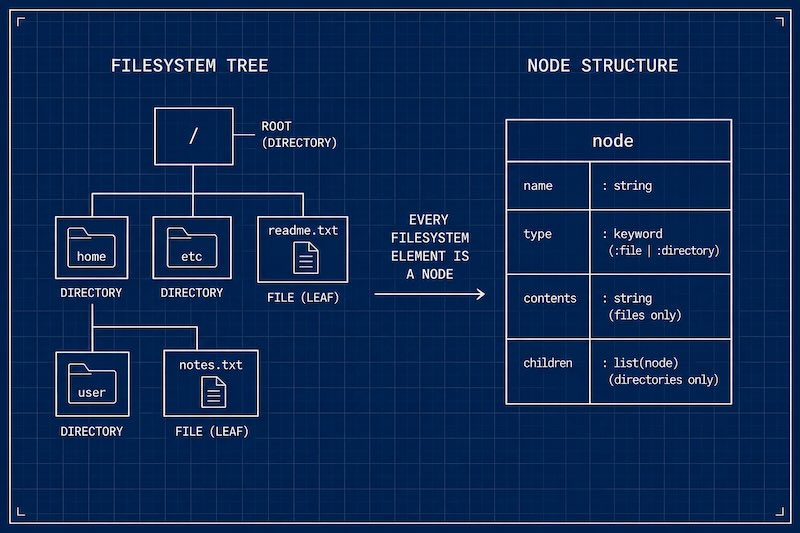
We’ll represent this with a simple struct:
(defstruct node
  name
  (type :file)
  (contents "")
  (children '()))
Each node has:
name: the filename or directory nametype: either:fileor:directorycontents: a string (only meaningful for files)children: a list of child nodes (only meaningful for directories)
The root of our filesystem:
(defvar *fs* (make-node :name "/" :type :directory))
An empty directory named /. Everything else will be children of this node.
Navigating the Tree#
To find a file like /home/notes.txt, we need to:
- Split the path into parts:
("home" "notes.txt") - Starting at root, find the child named
"home" - From there, find the child named
"notes.txt"
First, path splitting:
(defun split-path (path)
  "Split a path string into a list of names."
  (remove "" (uiop:split-string path :separator "/")
          :test #'string=))
"/home/notes.txt" becomes ("home" "notes.txt"). We remove empty strings to handle leading and trailing slashes.
Now the tree walker:
(defun find-node (path)
  "Walk the tree and return the node at path, or nil if not found."
  (let ((current *fs*))
    (dolist (part (split-path path) current)
      (let ((child (find part (node-children current)
                         :key #'node-name :test #'string=)))
        (if child
            (setf current child)
            (return nil))))))
Let’s break this down:
dolistiterates over each part of the path- The second argument to
dolist(current) is the return value when the loop completes normally - Inside the loop, we look for a child matching the current part
- If found, we update
currentand continue - If not found,
returnexits the loop early withnil
Why dolist with return instead of recursion? This is a simple linear traversal because we know exactly where to go at each step. Iteration is natural here. We save recursion for when we need to explore (like searching the whole tree). But feel free to do an implementation using recursion.
Creating Directories and Files#
To create a directory or file, the parent must exist. First, a helper to find the parent:
(defun get-parent-directory (path)
  "Return the parent directory node for a path, or nil if it doesn't exist."
  (let* ((parts (split-path path))
         (dir-path (butlast parts)))
    (if dir-path
        (find-node (format nil "~{/~A~}" dir-path))
        *fs*)))
For /home/docs, this returns the node for /home. For /home, it returns root.
The format directive ~{/~A~} deserves explanation:
~{...~}iterates over a list/~Aprints a slash followed by each element- So
(format nil "~{/~A~}" '("home" "docs"))produces"/home/docs"
This reconstructs a path string from a list of parts.
Now node creation. Both files and directories share the same logic, so we factor it out:
(defun create-node (path type &optional contents)
  "Create a node at path. Parent must exist. Returns the node or nil."
  (let* ((parts (split-path path))
         (name (car (last parts)))
         (parent (get-parent-directory path)))
    (when (and parent (eq (node-type parent) :directory))
      (let ((existing (find name (node-children parent)
                            :key #'node-name :test #'string=)))
        (if existing
            (progn
              (when contents
                (setf (node-contents existing) contents))
              existing)
            (let ((new-node (make-node :name name :type type :contents (or contents ""))))
              (push new-node (node-children parent))
              new-node))))))

(defun create-file (path &optional (contents ""))
  (create-node path :file contents))

(defun create-directory (path)
  (create-node path :directory))
If the parent doesn’t exist, we return nil. No magic recursive creation, the user must create each level explicitly. If a file already exists, we update its contents. Directories just return the existing node.
Note we use push to add children, not append. Why?
pushadds to the front of the list O(1), constant timeappendadds to the end O(n), and must traverse the whole list- For a filesystem, order usually doesn’t matter, so
pushis the right choice
This is a common Lisp idiom: build lists with push, reverse at the end if order matters.
Filesystem Commands#
Now we expose this to users. The two main primitive commands are mkdir and touch:
(register-command
 (make-command
  :name 'mkdir
  :description "Create a directory: (mkdir \"/home\")"
  :function (lambda (path)
              (if (create-directory path)
                  (format t "~%Created ~A" path)
                  (format t "~%Cannot create ~A (parent doesn't exist)" path)))))

(register-command
 (make-command
  :name 'touch
  :description "Create a file: (touch \"/home/notes.txt\")"
  :function (lambda (path &optional (contents ""))
              (if (create-file path contents)
                  (format t "~%Created ~A" path)
                  (format t "~%Cannot create ~A (parent doesn't exist)" path)))))
If the parent directory doesn’t exist, we tell the user instead of silently failing.
Listing directories:
(register-command
 (make-command
  :name 'ls
  :description "List directory contents: (ls \"/home\")"
  :function (lambda (&optional (path "/"))
              (let ((node (find-node path)))
                (if (and node (eq (node-type node) :directory))
                    (if (node-children node)
                        (dolist (child (node-children node))
                          (format t "~%  ~A~A"
                                  (node-name child)
                                  (if (eq (node-type child) :directory)
                                      "/" "")))
                        (format t "~%  (empty)"))
                    (format t "~%Not a directory: ~A" path))))))
Directories get a trailing / to distinguish them from files.
Reading and writing:
(register-command
 (make-command
  :name 'cat
  :description "Show file contents: (cat \"/home/notes.txt\")"
  :function (lambda (path)
              (let ((node (find-node path)))
                (cond
                  ((null node)
                   (format t "~%No such file: ~A" path))
                  ((eq (node-type node) :directory)
                   (format t "~%~A is a directory" path))
                  (t
                   (format t "~%~A" (node-contents node))))))))

(register-command
 (make-command
  :name 'write
  :description "Write to a file: (write \"/home/notes.txt\" \"content\")"
  :function (lambda (path contents)
              (let ((node (find-node path)))
                (cond
                  ((null node)
                   (if (create-file path contents)
                       (format t "~%Created and wrote to ~A" path)
                       (format t "~%Cannot create ~A (parent doesn't exist)" path)))
                  ((eq (node-type node) :directory)
                   (format t "~%~A is a directory" path))
                  (t
                   (setf (node-contents node) contents)
                   (format t "~%Wrote to ~A" path)))))))
write creates the file if it doesn’t exist, but only if the parent directory exists.
Let’s handle removing files:
(register-command
 (make-command
  :name 'rm
  :description "Remove a file: (rm \"/home/notes.txt\")"
  :function (lambda (path)
              (let* ((parts (split-path path))
                     (filename (car (last parts)))
                     (dir-path (butlast parts))
                     (dir (if dir-path
                              (find-node (format nil "~{/~A~}" dir-path))
                              *fs*)))
                (if dir
                    (let ((child (find filename (node-children dir)
                                       :key #'node-name :test #'string=)))
                      (if child
                          (progn
                            (setf (node-children dir)
                                  (remove child (node-children dir)))
                            (format t "~%Removed ~A" path))
                          (format t "~%No such file: ~A" path)))
                    (format t "~%No such file: ~A" path))))))
Project Structure#
Alright, we have a virtual filesystem. We have more logic to handle the tree, and the conditions to ensure the consistency of our filesystem, but in essence, we are just manipulating lists of symbols.
Let’s take a look at the files:
repl/
  repl.asd       # System definition
  packages.lisp  # Exports including filesystem functions
  core.lisp      # Command system
  threads.lisp   # Thread system
  fs.lisp        # Virtual filesystem
  repl.lisp      # Main loop and all commands
Running It#
As usual, to run this:
cd repl
sbcl
(ql:quickload :bordeaux-threads)
(load "repl.asd")
(asdf:load-system :repl)
(repl:my-repl)
And now we can use it:
Welcome to REPL OS v4
Type (help) for commands, or any Lisp expression.

λ (ls)
  (empty)

λ (mkdir "/home/docs")
Cannot create /home/docs (parent doesn't exist)

λ (mkdir "/home")
Created /home

λ (mkdir "/home/docs")
Created /home/docs

λ (ls)
  home/

λ (ls "/home")
  docs/

λ (write "/home/notes.txt" "Hello from the virtual filesystem!")
Created and wrote to /home/notes.txt

λ (ls "/home")
  docs/
  notes.txt

λ (cat "/home/notes.txt")
Hello from the virtual filesystem!

λ (quit)
Goodbye.
What We Built#
I hope you are enjoying this ride. So far, we have built an OS that can handle multiple commands, threads and files.
- Node structure: tree of files and directories
- Tree operations:
find-node,create-directory,create-file - Commands:
mkdir,touch,ls,cat,write,rm
This is a fully functional in-memory filesystem. It’s isolated from your real files, so this is a safe sandbox to play around. It’s also explicit: you must create each directory level yourself, so you understand the structure you’re building.
What’s Missing#
Quit the REPL, and the filesystem is gone. Everything lives in memory and nothing survives a restart.
In Part 5, we’ll add persistence. This is interesting and gets even closer to the idea of the Lisp machines. We will build the ability to save the filesystem to disk and load it back on startup. We’ll also add tree and find commands to visualize and search the filesystem.
Next: Part 5: Persistence